Batch Billing
Accounts Receivable
Billing
Batch Invoices
Customers being billed for the same flat amount
Creates, calculates, & prints all invoices in a specified department at the same time.
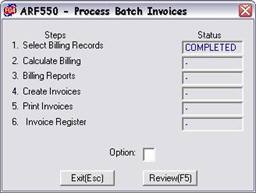
When printing batch invoices the following box will appear. The user will follow the steps the complete the batch invoice process.
-
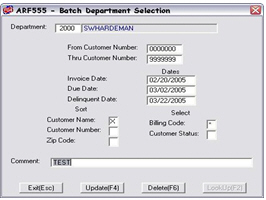
Select Billing Records – the following screen will appear. F2 to select the department, if all customers will be selected enter through the customer numbers. If there is a range of customers to be printed key in the range of numbers. Key in the invoice date, due date, & delinquent date. Select the method of sorting for the bills. Select the bill code & customer status by using the F2 lookup. Last key in a comment if needed.
-
Calculate Bills - Option will calculate the bills amounts.
-
Billing Reports – Edit report will show any edits that may exist after the billing has been calculated. The Pre Invoice Register lists each individual along with bill code, the amount, units, tax, & total. If the information is wrong the user can still go back & fix the problem & then rerun the steps.
-
Creates Invoices – this option will create an invoice for each individual customer that appears on the Pre Invoice Register. Once this step is ran the option to go back & fix a problem is more difficult. The invoices will have to be voided & then the customers invoiced again.
-
Print Invoices – select the printer & print
-
Invoice Register – displays like the Pre Invoice Register. If the Pre Invoice Register is printed then the user may not want to this one also.